Update: You could win this very iPod over at Money Blogger. Enter now!
Two years ago I bought a first generation iPod Nano on the day they came out. I fell in love with the Nano as soon as I saw it, and despite being covered in scratches now, I still love it.
I wasn’t a fan of the second gen Nano though. It looked way too much like the old Mini, and that was a step backwards in my book. It seem to me like Apple had rushed out a brushed aluminium case simply to deal with the scratching issue, and in the process had destroyed the sleek look of the original.
Last week, the third generation Nano was announced, and I immediately fell back in love with it.Having played with one in the Apple Store, I decided it was time to upgrade, and came home with this lovely blue 8Gb number.I’ve had it a couple of days now, so I thought I’d share some of my initial impressions.

Form Factor
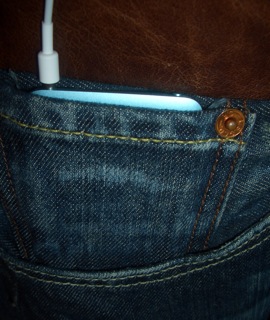
The most noticeable change from the old Nanos is the completely new size shape, which has obviously been designed around the enlarged screen. Many people have called it the ‘fatty’, due to it’s shorter, wider form factor, but personally I love the way it looks.It’s not quite as easy to hold as the 1st and 2nd gen Nanos, but you get used to it pretty quickly.At the original Nano launch, Steve Jobs pulled a Nano from the little coin pocket in his jeans, but my old Nano never quite fit in that pocket for me. This third gen Nano is exactly the right size and shape for the small pocket on my Levi’s jeans. The scroll wheel even works through the denim, so when I’m out, I can take my Nano with me without having to worry about it getting scratched. Perfect.
Build Quality
One of the first things I noticed about this new Nano was the build quality. Two years ago, I thought the original Nano was a masterpiece, but this definitely takes it up a level. The brushed aluminium case is gently beveled on the front to give a pleasing feel in the hand, and it just feels solid and well put together.
Apple have gone back to using shiny aluminium for the back of the iPod again, which I do like, but seems to have the ability to attract finger prints just by looking at it. This is a bit of a shame as it’s very noticeable, and Apple don’t seem to have come any closer to solving the problem.
The Screen
The new Nanos all have a 2 inch 320×240 screen, which is a significant improvement over the old screens. In pixel density terms, it’s the highest resolution screen I’ve ever seen.Combined with the new software and the ability to play video, the screen is the real USP of the Nano. It’s bright and beautiful and text is so much easier to read than the old Nanos.
Software
The Nano’s software has improved significantly in the last 2 years, and this version is the best yet. The menus are all familiar and easy to navigate with the scroll wheel – they just have more polish. The menus take up the left half of the screen with cover art, video stills and other useful, contextual information appearing on the right hand side.
The most touted addition to the software was ‘Cover Flow’ – an animated view of all your cover art that will be familiar from iTunes. I personally don’t find this particularly useful, and although the animation is quite smooth, there can be a noticeable delay in loading in new cover art if you scroll quickly.
I’ve also noticed a bug when playing a song that sometimes cover art just doesn’t load at all. Navigating to the next song, then back usually makes it appear, but it can be quite annoying at times. Hopefully this will be fixed with a firmware update.
Video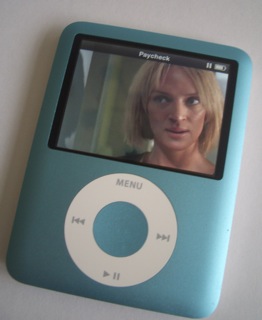
This is probably the biggest addition to to the Nano and (along with the upgrade to 8Gb storage) was my main reason for upgrading. My video library is quite extensive and I tend to watch a lot of video podcasts, so being able to keep up to date with them wherever I happen to be is a big winner for me.And video looks great on the Nano. The screen may be small, but it’s easily good enough to watch video.
I wouldn’t recommend watching a full length feature film on it (I’ve tried), but that’s mainly because it’s quite difficult to keep the damn thing still for that length of time. It’s not the resolution or the brightness that’s the problem, it’s little movements that mean you have to refocus your eyes constantly.
Games
Games have certainly improved since the first generation Nano. They actually feel like a modern game rather than something written in 1983 and hacked by Apple to use the scroll wheel. I particularly like the ‘iPod Quiz’ which uses your music library as the basis for the questions, but has a real game show feel to it.
The other games are pretty good too and obviously take advantage of the increased screen size and processing power of the Nano. I can definitely see Apple selling a lot more games on the iTunes store from now on.
Overall
What can I say – I love the new Nano. There are a couple of minor firmware bugs, but all in all it’s the nicest – and cutest – personal media player I’ve ever seen.
The only issue for some people will be the storage capacity. At a maximum of 8Gb, it’s just not going to be enough for some people. Personally, I make judicious use of Smart Playlists in iTunes and try to give everything in my library a rating. That way I can make sure I always have my absolute favourite songs along with a good selection of everything else in my library.
Aside from storage capacity, I don’t really know how Apple could improve the Nano in it’s current form. It can’t go much thinner and still incorporate a standard headphone jack, and it can’t really be made any smaller and still incorporate a scroll wheel.I expect we’ll see a touch screen Nano in the next couple of years with a bigger display, but without the scroll wheel. The screen is certainly getting towards the point where Apple’s “Multi Touch” technology would work. But knowing Apple, the next generation of iPods will come up with something even more exciting, and I’ll just have to go out and buy one again…
i am very impress by nano technology
the chromatics are much more up to date
the chromatics are much more up to date
i have the 3th gen also.. but i have already problems with it…
i have it for 2 days now. and when i wanted to charge it today… it was just like a Windows computer… only no bleu screen… i can’t get it off or go to the menu or something… its just stuck…
anyone got any idear how to solve this issue?
1) you can reset it (slide the hold switch, wait 8 seconds, slide it back, than hold the menue and select button for 10 seconds and it'll restart)
2) when in iTunes, go to your ipod's section, on the bottom, (if it is checked) un-check "Enable Disk Use" because Disk use makes it used by the computer there fore it cant eject and still charge.
Hope this helped!
hit the center and menu button at same time resarts it
i recently bought a nano 3rd generation and im having problems too. no music or videos will play. they worked the day previously and i cant find anyone else with the same problem can anyone help?
1) go to Store (in the file menue, by controlls) > Authorize computer than go to step 2.
2) plug it in and restart it (slide the hold switch, wait 8 seconds, slide it back, than hold the menue and select button for 10 seconds and it'll restart)
now, if all else fails, restore the ipod.
well not sure but try resarting it
most problems with the iPods can be resolved by plugging it in2 ur comp, and restoring it to factory settings. another thing could be a faulty video/audio file. i put a ronaldinho Vodcast in2 my iPod and sometimes the iPod just resets after i put that in so after i deleted it, the iPod works perfectly.
If you’ve updated the firmware on the Nano (I believe current is 1.0.2?), there are known bugs with it, I believe a downgrade of firmware will fix it up. If you search for the support forum on Apple’s website, you’ll find solutions to your problem(s).
Do you have to update the firmware on the Nano? I’m having a problem with the Nano shutting off when using my iHome. iHome said it’s a known problem with firmware version 1.0.2. Can you avoid using that version of their software?
hi well i just get my ipod nano yesterday and today it didnt want to work the thing is that it run out of battery and then i conented to my laptop. it seems that everything was working perfectly but in the screen was saing “eject, then disconect” or something like that well then my brother disconected and now it doesnt want to work i already try alot of things but anything works HELPPPPP!@!!!!!!!!!!!!!!!!!!!!!!!!!!!!!!!!!!!!!!!!!!!!
JM: If you can’t get it to work, I suggest taking it back to Apple.
H.E.L.P!!..i just bought an IPOD NANNO 3GNR and it was workin FINE until..the 3RD day!!!! I WENt to charge it…nOte.it charged withowt any problems wen i got it…. and IT JUST WENT ALL WHITE..lYK Before that it was ok and then as soon as i plugged it to charge it went white. WAT DO I DO AND HOW DO I FIX THIS PROBLEM!!??..itz still on and WHIT SCREENED!!!!
plz help…
my ipod MYTE BE SIKK!!>…
restart it,
plug it in and restart it (slide the hold switch, wait 8 seconds, slide it back, than hold the menue and select button for 10 seconds and it'll restart)
I just bought the new 3rd gen nano, after 3 days and loosing power, I re-charged it. after an hour of charging a horizontal line appeared on my screen, tried re-set and it’s still there…. WTF!!!!
Is there a way to fix this? or is this a firmware problem????
HELP!!!!
plug it into Comp, and than reset it. (iPod selection in iTunes, than there is a Reset button. it may be labeled as restore.)
if your third gen ipod nano freezes up all you have to do is hold the center and menu button down for 6 sec
Thank you so much (Y) I thought i had broken my mums iPod!!!
tnx for ur suggestion. IT WORKS ! ! !
Thanks Brandon, this fixed my white screen.
THANK YOU BRANDON!!
We have had the 3rd gen nano (our first ipod except gen 1 shuffle) for 2 days. Today it stopped playing music – display looked fine, but it wouldn’t start the songs.
We did the reset – depressing menu & centre button for 6 sec – and our trouble is resolved!!
Thanks for the tip.
OMG ! THANKS SOO MUCH BRANDON ! WAS GETTING SOO ANNYOED, NOW WORKS FINE, THANKS !!!!!!! YOU ARE A LEGEND !
Ive had the ipod nano 3rd generation for about 4 weeks. I turned it off and put it in hold, now even when i put it off of hold nothing is happening…its like iot is frozen…..WHAT DO I DOOOOO…..HELP PLEASE ASAP
same situation please if you find solution help me ..
I bought my iPOD nano 3rd generation a week ago. It was working fine the first day. I plugged it in to my PC that same night and left it plugged for 2 days. The third night, I went back to start uploading music to it and it was shut off. I tried to turn it on but it wouldn’t. For some reason at that point, my pc strated to freeze up. So I restarted the pc thinking that it is a computer problem. Apparently, it was not. I plugged my iPOD to my laptop after that thinking that may be my PC was acting up. Right after I plugged in, my laptop started to act up as well. So I tried the menu and the center button thing and it worked. It brought back my iPOD to life again. However, everytime I leave my iPOD plugged in for more than 24hrs, it will shut itself off and I’ll have to re-do the Menu/Center Button thing. Is this a common problem with them because it’s frustrating. I’m taking mine back. Apple sucks
the iPod shuts off as to not kill the battery, dont leave it plugged in past the "Charged" point, or it starts acting up.
There are two sorts of usb ports, the ones on the front of the computer are not the high speed USB ports, neither are any external usb ports attached to the computer. Go ahead and do your center and menu reset, then plug your cable into the back of the computer, not the front. the back has high speed 2.0 usb ports, those have enough power to keep the charge up and not drain your device. Also, go into the Ipod settings and change the backlight timer to 5 seconds or less. That conserves battery power. If you get really desperate for it to hold a charge, do what people that are experienced with batteries do and believe it or not, stick it in the refrigerator for a while (NOT the freezer), sometimes you have to leave it in there overnight. I have a 80 gig Ipod Video 5th gen and it is older, that is how I deal with it's quirky-every-once-in-a-while complete shutdown.
i just got my Ipod todayi was looking on the web for accesories for my Ipod and i found out that the accasories like earphones were like 50 bucks.THe only good stuff the youcan buy for is speskers and skins.By the way if you go on the best buy website yuo can find skins of a variety of coulors for only 46 cents each!!!!!!!!WOW!!!!!!!.Right now my Ipod is charging beside me it is silver , i would rather have it red but who cares i got it for free on christmas morning. I guess the thing is o.k . I am so exited to use it!!!!!!!!!!!!!!!!!!!!!!!!!!!!!!!!!!!!!!!!!!!!!!!!!!!!!!!!!!!!!!!!!!!!!!!!!!!!!!!!!!!!
helen & brandon……..thank u!!!!!!!!!!! i fixed my problem!!!!!!!
i got this thing yesterday, Christmas Morning, Black 8 gig
first thing to notice was the screen was crooked, and going to the left, as if the little chinese Boy who put it together did a dodgy job
then i noticed the Click wheel was over sensitive, THEN the click noise i noticed was screwy, THEN i put a video on it, next day (today) i start using it, its already got a dead Pixel!
AND another one to the left of it developing!
PIECE OF SHIT >.<
so mums taking it back to demand a replacement one, i told her not to bother sending it away because i dont want somone elses half assed repaired one!
p.s
Fuck You Apple <3
1) this is the first time in all my research of the 3rd gen nano that i've heard of this, so i think getting a replacement would be fine.
2) i really thing that the comment about the chinese boy is a little harsh
3) apple is a good company.
i got my ipod yesturday and i went to go charge it and unpluged it when the screen said do not disconnect and now it won’t work.opps . what can i do now.
kso, like, my ipod, i dont know whats up with it. ive been downloading music vids and stuff, and I go to play them on my iPod, and they tell me that they werent placed on the iPod cause they cant be played on them. can someone help, and btw i got a green 8gb nano third gen.
ok, 1) go to the store DROP down menue (in the FILE area, by Controlls) and click "Authoirze Computer"
if this doesnt work, email apple.
Like omg my ipod wont turn on! Help!
mine either!! figure out your problem?!?!
What Brandon says works just hold the menu button and the middle button down for 6 seconds……..I had the same problem as most of you and it works thanks so much!
I LOVE UU!!!!
Oh, and does anyone have suggestions for a good case for it thanks
ive had myipod couple of weeks now but tries to turn it on this morning and wont, tried centre button for six seconds but still nothing is there anything else plz.
1) you have to press Center AND menue for six seconds, and if that doesnt work, slide the hold button over for 6 seconds, than slide it back so that it's not in hold, and press and hold the center and menue for 8 seconds.
i have suggestion for case try this one http://www.play.com/Electronics/Electronics/4-/3512098/Switch-Easy-Case-For-New-iPod-Nano-3rd-Generation/Product.html
i fixed my ipod yee
I have just got a 3rd gen nano for xmas. It works fine until i put in my Cyruslink Speaker System / Docking Station it then freezes and i can not do anything! i have to reset it (Menu + center) every time anyone got any ideas if this is a known problem or how i can fix it??
yo my dock cant fit!! is it just too big or is it supposed to be like that for if i buy a cover for the ipod
this ipod is nice and all but it wont turn back on/ i know for a fact it has full battery its only 3 days old. i think it might have to do with the sleep feature because that is the last thing i have done to it so if y ou got any answers please email me.
same problem as
“daniel hart
December 27th, 2007 at 11:39 am”
u know what it might be in sleep and the hold button is broke because it dosent slide the same as it use to
my nano is only 3days old and its already messed up.it wont play any music.anyone know how to fix it?
thanks for the tip about the center and the menu. Unfortanately..i have a dumb bf. He wanted an Ipod Nano 8GB for christmas so i bought him one..and he wanted me to put all the songs in there for him..so i did..and when i had it w/ my computer..it was fine..but as soon as it got to him…after he used up all the battery the first time and it shut down…when he turned it back on..and let it charge..he told me that whenever he press a song…it just turns to a blank screen..and we’ve been figuring out wat to do w/ it..but i’ll see if this can help..i’ll come back w/ feedback if it works. thanks tho!
No one has seemed to have the same probelm as me. My ipod worked fine until i tried to play it yesterday. It plays music & background noise perfectly, but when vocals play it soulds like it is in a washing machine. You can’t even understand what is being said. Does anyone have any advice?
got a lovely gift of a 4gb nano, looks nice but has one major flaw it won’t work. It’s shut itself down and won’t turn on. the art work won’t come up and the EQ is only there as a show piece. Apple are getting as bad as dell when it comes selling shite !!! as Elvis says return to sender.
~P.S. my computer too frezzes when I have used it plus the sounds really bad on it ???
Thanks so much for the freeze tip! I was near tears! =]
I got a 3rd gen a couple of days ago as well. A black one. Worked great the first day but then the scroll wheel developed a mind of its own. If I try to adjust the volume it either goes way up or way down or bounces in the middle. Likewise, if I try to select a particular feature it will let me scroll to that feature and then it jumps up to another one. Very frustrating. Anyone else had this problem? I bought it at Wal-Mart so I may just take it back and get a replacement unless anyone can’t point out a user error. Thanks.
Darin: I’ve noticed something similar on mine once or twice. It’s like the scroll wheel has become hyper-sensitive. You could try gently cleaning the front of the nano, but if that doesn’t help I’d just take it back and get a replacement.
Daniel Hart, how did you fix this? I have the same issue.
Dear All…I’ve just got my ipod nano 3rd gen. I’m really confused. How long should I charge the battery for the first time? Some people say I should charge it for like overnight (about 16 hours), and some say only about 3-4 hours. Plz help me, which one is correct based on your experience???
OMG i have the same i pod as you! mine just quit working I have been online looking for ways to fix it and nothing worked. to me it seems like they messed up on this generation of Ipods if you ask me. It looks like you are the one off the few that has had succes. oh and brandon and helen your idea does not work.
i have downloaded my photo’s onto my ipod 3rd “gen” and When I go to view them individually on my Ipod the screen goes black!
This has never happened before!!
PLEASE HELP!!
Hi there i just bought a nano 3rd g nd had a problem with it so i went onto the apple website (www.apple.com) support-5 step solution-nano 3rd g nd it was bak 2 normal after the 3rd step
i reccomend every1 with a prob try it
bob
Oh My Dayysss,,
Got The Lovely iPod Nano 8gb 3rd Gen For Christmas,,
It Worked Beautiful Until Two Dayys Agooo,,
My Click Wheel Will Not Work,, It Doesnt Work At All,,
Ive Reset It,, Reset It To Factory Settings,, Done EVERYTHING.
Also The Buttons Arent Working Either!
If I Press Menu Or Select etc,, They Dont Register Im There Stabbing At Them Repeatedly!
I Was On The Bus This Morn && All My Mates Who Have One Cudnt Figure It Out.
I Think It Just Doesnt Like Me 🙁
ANY SOLOUTIONS?
or its going back to argos.
where it will die (Y)
xx
i bought my ipod about two weeks ago and i went to turn it on then i turned off. it not responing to anytihng. i tried car chargers, plugging it into the computer, the screen just went black, and i tried to hold all the botton nothing plzzz hepl!!!!
I just want to say, i have the 3rd gen… it’s black and it’s awesome! I also have problems with my nano freezing up, but now i know how to fix it. It all started when i bought this special connector for my navigation system. After i disconnected my ipod from my Pioneer and reconnected it to my computer, it would freeze. Someone told me to hold the menu and centre button down, but didn’t tell me for how long. Finally i figured it out cause Brandon told me 6 seconds. Thanks man, now i can solve this on-going problem.
Definitely experienced the same situation, where my IPOD NANO 3 gen just died, froze up with a white screen out of no where, after playing tunes for 30 mins or so, battery was charged… Tried Brandon’s wise words of holding down MENU button and middle button for 6 sec and it was all back to normal, it unfroze and I was back to rockin the tunes again! Thanks Brandon and internet!!!! I was getting a little nervous there, only had my IPOD for 3 weeks!
I’ve had my iPod for about a month now and a few days ago I downloaded some software that iTunes told me to download onto it, I’m not sure which software it was but now my iPod has frozen, won’t respon and won’t register in iTunes. WHAT DO I DO?!??! I TIHNK IT’S BROKEN!!!!
Eyy.. i have a weird problem with one specific song.. “Low” By Flo-Rida And T-pain.. it plays to 0:17 and then goes to the next song.. i can scan it to over 0:17 but when u let go of scan it automaticly switches. i have ver. 1.1 Any1 know why?
all u hu brandon helped are mentaly retarded read the fucking manuel the reset tip is in there
I have an 8G 3rd generation nano that shuts down after random songs to the apple logo then back to main menu. This is my second one to do it. Is it my music?
i have brought two ipod nanos and they are terrible.
the first one kept on reseting when its not on the charger in the first few weeks.
the second one goes red hot on the back and says that it is flat while on the charger it says it is fully charged,
being very hot it is very dangerous for my daughter.
i definitly will be sending these back.
I bought my ipod nano 8G 3rd gen. , my brother turned it off , and now it wont turn on! Plz help!!!!!!!!!!!!!! i’m desperate . i’ve only had it for 2 weeks
my ipod is fucking frozen can you fuck tell me how to fucking fix it
My ipod was working fine like a week ago but it wouldn’t turn on the other day which usually means that it needs to be charged. When I plugged it into my computer the gray screen with the Apple icon appears and then I may get a quick flash of my main screen before it just shuts off and then the gray screen comes back and then it just shuts off. It does it over and over again..could someone please help me figure out what’s wrong with it??
Thanks peeps
Thankyou people
u fix my ipod
i have the biggest and my puzzled problems of all…
i had my nano 3rd gen for a month, usually put on music and podcasts. but yesterday i wanted to put a show on, bought it downloaded it and tried to put it on my ipod but it says it doesnt have the files to play it, the computer has the show in the files, and i tried the restart thing but everything is the same, and also some of the cds on cover flow are out of place.
What is going on, what r the problems, and how can i fix it w/o going to apple, or buying a new nano!?
also, i tried hooking it up on my computer and its does recharge but it doesnt go to the connected screen that it usually goes to when its hooked up to the computer, my computer doesnt recognize it and it says the usb is malfunctioned on different computers
i have had my ipod nano for since x-mas now all of a sudden i went to play and nothing. its all charged up. i don’t understand? it was working fine an hour ago then nothing. it won’t even turn on. i pressed the middle button and still nothing. all i have is what it looks like turned off. can someone help me please?
Hey i bought my girl friend a 3rd gen nano for christmas and the screen back light i have tried to restore, reset and looked through the menu its as if the light has just died and ideas?
“Eyy.. i have a weird problem with one specific song.. “Low” By Flo-Rida And T-pain.. it plays to 0:17 and then goes to the next song.. i can scan it to over 0:17 but when u let go of scan it automaticly switches. i have ver. 1.1 Any1 know why?”
OMFG i have the exact same problem with that exact song i hav no idea how to fix it
okay lets start by saying the ipod statred just fine but on 3-12-08 it wouldnt charge or turn on it is fully charged so
So evidently this atrocious device likes to play mind tricks w/ me b/c this is the second time it hasn’t worked. I was attempting to pause a song and suddenly the whole screen went white and I tried everything… didn’t work. Even when I plugged it into the computer it didn’t even show that it was on iTunes… I’m terribly aggravated!
Omg..guys thanx so much!!!!!!!!!!!!!!!!!!!!!
i dunno what i would of done if i didnt read your comment..you really helped me bring my ipod back to life.
thanx heaps
This sucks, i was listening to my ipod nano 3rd generation and all of the sudden the screen went completly white and whenever i reset it, it just beeps twice, but after i restored it to factory settings and tried everything the apple website said, the screen is still white but i can still play music, any ideas?
”
“Eyy.. i have a weird problem with one specific song.. “Low” By Flo-Rida And T-pain.. it plays to 0:17 and then goes to the next song.. i can scan it to over 0:17 but when u let go of scan it automaticly switches. i have ver. 1.1 Any1 know why?”
OMFG i have the exact same problem with that exact song i hav no idea how to fix it”
I have that problem too! I’ve downloaded a gazilion other ones of that song and they all do the same thing! On itunes it’s all fine and stuff but then it freezes up at the spot on my ipod!
Help?
Here’s how to fix it: Right click the song in your library and click convert to AAC. It should start playing when it’s done so find the original version and delete it, then put the new one on your ipod.
Help!!! I’ve tried everything!! I just got my ipod and yesterday (20TH)
it wont turn on and ive tried the whole 6 second thing and it STILL wont turn on at all!!!!!!!!!!
Please help me!!!!!!!! 🙁
I have a 3rd generation nano as well. I’ve had it for a week and now I can’t even reset, charge or even turn the thing back on. What’s even worse is that this was a product sent to me via citibank. They took two weeks to send a proof of purchase so now I’m past the fourteen day return / exchange grace period. I am seriously disappointed in this product.
i bought an ipod 4gb 3days ago and it was working fine until yesterday i turned it on and there was no albut art or anything being displayed on the right half.no song,video,or game can be played..i reset it and its okay…is ther any way of preventing it from happening again??
Hi Chris; I have the same problem as you – I have no choice but to send mine back to Apple. Really annoying too. Ring them up (0207 1539000 in the UK) and explain the problem – they will probably ask you to send it back. Hope this helps.
thatnks brandon it really worked
Hey,
When you get your ipod plug it in, Because I got my ipod when they first came out, I was listining to it, and it stopped, I couldnt play songs, movies, games and the album artwork was stuffed. I plugged it into the computer factory reseted it, and then i downloaded new firmware updates and it was fixed. Also, album artwork sometimes takes awhile to load, Espeicaily after you charge it, or you have just turned your ipod on.
Btw, Would it stuff my ipod nano 3g battery or LCD screen if i left it plugged into my ipod docking station all night?
Backlight on 3rd generation nano stopped working. Plays fine and can read the screen but only if I hold it under a light.
Any ideas????Help!!!!!!!!!
i have updated songs onto the 3rd gen. nano but all info (music/photos) do not show up in the ipod….however in memory status it indicates a use of memory. how can i get my music to show?!!?
Please help me,
I have had my ipod since October. It plays all of my music fine, when it’s in my stereo. When i use headphones, all hell breaks loose. It’s playing my songs, but I can’t hear them. I have tried numerous pairs of headphones. The headphone jack looks ok. what do I do!
also, i tried hooking it up on my computer and its does recharge but it doesnt go to the connected screen that it usually goes to when its hooked up to the computer, my computer doesnt recognize it and it says the usb is malfunctioned on different computers
I do have Ipod Nanno. I tried hooking it up on my computer and its does recharge but it doesnt go to the connected screen that it usually goes to when its hooked up to the computer, my computer doesnt recognize it and it says the usb is malfunctioned on different computers
I have second generation Ipod Nanno. I tried hooking it up on my computer and its does recharge but it doesnt go to the connected screen that it usually goes to when its hooked up to the computer, my computer doesnt recognize it and it says the usb is malfunctioned on different computers
i got the ipod 3rd generation and the volume is stuck…. when i turn the volume up or down it doesnt change.. it shows that its giong up and down but nothing happens.. wats wrong with it?!!! ppl said its because of my head phones but i tried more than one headphones and still nothing.. and i tried the center and menu buttton thing but still nothing…HELP me please….!!!!!!!!! help me..
does ipod nano 3rd generation work with the black ihome
i upgraded my iPod 3rd Gen to version 1.1.2 and now i’m screwed over. to connect to iTunes it has to have iTunes version 7.6, but to have that version of iTunes the computer has to be Service Pack 2. But I can’t get Service Pack 2 on my computer for some reason. anyone know how to take the recent upgrade off the iPod? or fix it at all…
i got my ipod 3rd gen. (green)(8gb) nano on xmas and it is about 5 months old. i noticed it was freezing and it wouldnt turn on and the center button was messing up in 1 corner. can anyone help me plzzzzz! How can i fix it. I fixed it once b4 but now it wont work!!!!!!!!!!!!!!! Apple you need to fix the nanos.
Hey I just bought a iPod nano 3rd generation this past Saturday and I let the iPod charge up for a day and the following day after I got all my songs and stuff on, I went to go eject it and i tried turning it on and it won’t. I tried doing everything that apple has on their website and it doesn’t work. Another thing is that when I go and plug it into the USB port it doesn’t want to read my iPod so it just sits with the apple logo on the screen.
Help!! I turn my ipod on & anhour glass looking icon appears on the screen. ( Not sure what it is) I can’t do anything with the ipod then. I don’t know if it is froze or what. Can anyone help?
If your ipod nano freezes all you have to do is press the middle and the menu button at the same time for 6 seconds it should work because it worked for me
hey chris and timo111!! i have had my ipod since the end of october and it is doing the same thing!!!! this is my very first ipod and am was impresseed at first but now i think apple sux. but how long does it take to get the ipod back from the UK?
Okay i put some movies on my ipod and it plays them for a few seconds and then switches to the next one??? anyone know why?
i have an green nano third generation and i’ve had it since christmas. the anoying thing is that sometimes it freezes in the middle of playingwhen i put it onto itunes to charge. its really annnoying me because i have to wait for the batterie to die before i can get it working again. do you think i should take it back?
hey im havin trouble wit my ipod. dis error 1418 keeps popin up nd i cant put da songs back onmy ipod. i got an ipod nano 8gb 3rd gen. if anyone knows how 2 fix it pliz tell me.
im bout 2 die here :'( ……..nd probs my ipod 2 :'(
HELP!
read every single comment, but none work for me, i dint even get to upload a single song onto the ipod. it just shows up a screen with a picture of a timer it does not respond, but it does charge.i can turn it on and off with the hold switch but doen’t seem to respond wen i hold the menu and centre buttons simultaneously, and the play/pause buttons simultaneously.maybe the thing has a natural hate for me, or maybe revenge of marmite is after me bcoz of what happened in 1997. oops rambled on abit there
any suggestions would be much appreciated thanks everyone
Phil
my music or videos wont play. and it wont let me put music or videos on it anymore. can someone help?
okay i got my Ipod nano 3rd Generation! some song work on it and some songs dont!like it worked teh other day and now half of teh osngs wont even start and cant fast forward on those songs it just stays on 00:00 i cant figure it out and i knew about the 7 sec hold the center shit but that didnt work either!!!!!!
i’ve had my ipod nano 3rd generation since christmas, and just last night it decided to not work.it just has a blank white screen with a whitr=e light and everytime i press somthing it shows the white light and beeps twice i have no idea wat i should do
I got my iPod nano 3rd generation for christmas and yesterday decided to use a few iTunes cards and downloaded a few songs and music videos. I also downloaded Monopoly. This morning i was listening to it and playing monopoly, whe all of a sudden it froze up and quit playing music. I don’t know what to do, and apple.com has no resourceful help system.
Ok. just tried to plug it in and restoree it, but there is no sign of detection. I need some major assistance!!! I am gonna try to call 1-800-MY-APPLE. I don’t know if that will work…
Try pushing the Menu and Center button for like 10 seconds and it should start working again… That’s what my friend told me to do after my ipod did the same thing- after i tried to plug it in and restore it. it froze up but now it works GREAT!!!
my ipod nano 3rd generation wont charged when connected to a regular wall charger. but when i connect it to my computer or docking station it charges fine. helpp ?
Mine suddenly froze after playing a game , even the computer wouldnt connect up to it properly . i did what BRANDON said , to press and hold the center button and menu button to RESET it and it work , thanks mate 🙂
Mii ipod is acting funni. I went to my purchases to drag and drop them into my ipod icon to download them but it won’t let me. Its just outline Grey and has a cancel icon o + / =
I hadn’t used my ipod for 3 or 4 days or so and i decided to put it on charge.
As soon as i plugged it in the screen just went white and made this digital “Beep….Beep” noise. I plugged it into the computer and it is the same except the screen is gray. Help me! I love my Ipod :'(
FUCK YOU BILL. THE IPOD GEN 3 IS A PIECE OF SHIT.
Ok, I replaced my old 8G Nano 3rd Gen because it was having a reset problem. Now this one is doing the same thing. Whenever I go to listen to a song or something it will reset (shut off), then come back on. Same thing happens if I go to the menu from listening to a song. Does anyone have a solution for this, other than I got screwed? Constructive criticism is greatly appreciated. Thanks.
Just got the Nano 3rd Generation a couple days ago, and I’m already having trouble. The screen is white, so I can’t read the display. I went through the five suggested steps and nothing works. A couple of other people seem to have had the same problems. Any suggestions?
I was listening to my ipod when the screen suddenly blanked out and the music stopped, though the click wheel still kept making clicking sounds. It’s fine when i reset it but this problem has reoccurred a few times, was wondering if there is anything i can do?
how much are ipod nano’s and wat is the biggest size they do
hey every one… iv had the same problems! mine is actualy frozin right now as i type… i usualy have to wate for it to die then charge it again. iv noticed that it usualy happens if i play a song too many times, or if i keep it on too long. but i dont know if there is anything i can do about it? i was thinking about returning it. any ideas?
hey ive had the same prob the screen went gray i tried reseting it and it just went straight back to the gray screen if anyone has the solution email me stat life.line@hotmail.com
hey i brought ipod 8GB nano 3rd generation 3 week ago from chine and having trouble. The ipod getting hang when i’m staring ipod plz help me . i thing operating system has been corrupted . plz helm me . wher i can get nano’s operating system . b’coz i try itune but that dosn’t work.
email-sanpresents@gmail.com
my ipod i dont know how to tell if its charging and when its in the computer itunes keeps shutting it off(its completlely outta battery power by the looks of it, idk juss got it) and it keeps beeping..what do i do?
also, it keeps turning on on itself when i try to reset it but it just shoes a white screen and nothing else
i just got my i-pod nano today and i went to charge it and the screen went whit and went ” beep beep” i don’t know why it does that and i’ve tried to do the reset thing but it just does it over and over…….anyone have the same problem that can help me???
THANKS BRANDON!
kk this so sucks i’ve had my ipod 3rd gen since April and today this morning all of a sudden when i went to go turn it on the screen went completely white and it wont reset!!! please help!!!!!!
yay never mind the screen went black then it reset when i wasn’t touching it well anyway. and i guess just leave it for a while and don’t play with it if that ever happens to you!
yo my 3rd gen ipod shuts down out of nowhere…. ill be playing music or a vidio n it will just shut rite down all the time what can i do to fix this?
If anybody Ipod keeps blancking out or freezing or maybe even shutting down the way to fix it is by restarting it the way you do that is lock and unlock about 5x or more until it is left to unlocked mode then hold the center and menu key down for about 15 seconds then as soon as you see the little apple on the screen wait about 5 seconds and press the menu key..
PLZ HELP!! how do i turn the crossfading on, on my 3rd gen 4gb??
Stephanie (October 10th, 2008 at 1:17 am) U R A GENIUS!!! thanks soooo much!! i got my ipod and the second day it froze…. after using ur advice its workin again!! thnx so so so so so mch!!
ipod backlight not working on nano 3rd gen, screen not cracked or dead pixels everything else works fine, did reset restore etc but nothing gets back llight back on .
will replacing screen work or are backlights separate any advise would be most gratefully recieved
ipod 3rd gen keeps restarting but never gets past the apple screen tried menu centre but nothing pc dosnt recognise it anyadvice
daughter very upset as was gift from her gran
To 123 & 124 – your best bet is probably to take your ipods to the closest Apple store and get someone to look at it. You might need to make an appointment at the Genius Bar:
http://www.apple.com/uk/retail/geniusbar/
My ipod has somebody elsese user name how do I change that name?????????????????????????????????????????????????????????
Please help me:(
may someone help me i got my ipod 3rd generation off my friend and it won’t turn on i tried recharging it but it won’t do i need itunes?? plz repond
OMG my ipod died!
i on it and it and only the backlight was there
i restored everything and now the screen is white but i can still listen to songs
CAN ANYONE HELP ME!
omg brandon i love you. my volume was working but none of the buttons were working. i held the menu and center button for 6 seconds and its working again thankyou
i got my ipod almost a year ago and i finally got to add songs to it i was listening to it the other night and when i turned it off it beeped four times and went black so when i tryed to turn it back on it wouldnt work i dont know what went wronge but i need HELP!!! if u know what i can do please help me i love my ipod and i dont want to have to get rid of it!!!
HOW CAN YOU CHARGE YOUR IPOD AND THE COMPUTER DOES RECONIZE THE USB
My ipod nano just shows the apple icon and goes blank AND DOES THE SAME THING CONTINUESLY and my computer does not recognize it. How to I fix this problem! Plz SOMEONE HELP
ive had my ipod for 3 days and it was working perfectly. then today i unplugged after it being charged and all the pictures of the albums were removed. now all the songs have a grey cover with a music note. does anyone know a solution or something i can do. i reset it and nothing happened
🙁
THANK YOU SOOOOOOOOOO MUCH!!! If your ipod freezes press your middle and menu button at the same time….IT WORKS!! AH I’m so happy I was about to cry!! You guys rock.
Brandon you ARE a star, still! My volume kept sliding back to max and I tried your Menu + centre button hold technique, it reset and now the vol works perfectly! Mwa!
ive downloaded free apps from itunes store for my ipod nano gen 3 but the problem is i dont know how to transfer the games to my ipod can any1 help plz write back as soon as u can plz plz plz fanx xoxo
Kaay, MY ipod is ON. and its doing everything right its working.. EXCEPT there no music playing and yes my headphone are plugged in and i had it charging all night so its deffinatly not dieing.. and ill put on a song and itll start playing and i can turn it on and off,, BUT I CANT HEAR ANYTHING.. Dx T-T x_x < this is how this is making me feel.. does anyone know how to fix this ?! 🙁
Hi i am from england i am wanting a ipod nano 3rd gen but all of them are above the ideal price i am prepared t opay, can u tell me any good stores to purchase an ipod with a decent price?
thankyou x
Help – just got the 3rd gen Nano. Says it needs iTunes of above 7.6 to run. But to put the lates iTunes (8) on the mac requires an update to QuickTime. But updating QuickTime requires a new Operating System than OSX 10.4 – it wants Leopard. Can this possibly be true that to use my new Nano I have to update my entire OS? Seems odd. I mean, it’s like $130 to buy Leopard. Also – noticed that iTunes doesn’t recognize my new Nano – is that because it is running on 7.6?
I’ve had the ipod nano for about 7 months sudddenly all of my songs disapear and I cant put them back on. I rested it and they went back on ,but no viedos and I cant put on anything new Plzzz help!
I have the new ipod gen 3. the color green, and I just got it for Christmas, and the next day it does’nt work. It wont want to turn on or charge. PLEASEEE HELPP ME!!!! I havnt even told my parents about it becuase then I’d be grounded for life!!!! SO PLEASE HELPP!!!!!
my bro just was playing a game (monopoly) on my iPod when it waas like fully charged and like 5 min later i try to turn it on and it wont turn ON!!! idk why???? i put it in my speakers all night but they werent plugged in?!!!!! WTF HELP!!! Does it need a new battery???? i just bought it in like february ithink of this year, or last, IDK i think 2008 yeah but HELP!!! im on vacation and i really need it to LIVE!!!!!!!
Help my daughter’s ipod went through the washing machine. Is there any hope?????
ive had my ipod for a moth and it was working perfectly. then today i unplugged after it being charged and all the pictures of the albums were removed. now all the songs have a grey cover with a music note. does anyone know a solution or something i can do. i reset it and nothing happened. thanks for ur help ! (:
month* sorry
month* sorry.
HELP!!!my Ipod Nanon 3rd Gen won’t trun off. It is stuck to the menu screen.Press any button won’t change anything. I hope someone will give me advise on what to do with this. Thank you.
Ok ive had my ipod nano 3rd gen. for about a year, it has worked perfect until today when i turned it off and put it on hold and when i went back to turn it on, it doesnt do anything, its just a black screen like its off! i Tryed plugging it into the computer and holding down the buttons and nothing works!!!!!! what do i do!?!?? help someone please!!!
HI .. I HAVE HAD MY IPOD NANO FOR A WHILE NOW AND ITS NEVER PLAYED UP TILL NOW .. LAST NIGHT I SYNCED MY IPOD PHOTOS ANND THEY WERE ALL THERE AND EVERYTHING THEN THIS MORNING THEY WOULDNT SHOW UP OR COME UP EXEPT FROM 1!!!!!!!.. PLEASE SOMEONE HELP!!!!!!!!!!!!!!!!!!!!!!!!!!!!!!!!!!!!!!!!!!!!!!!!!!!!!!!!!!!!!!!!!!!!!!!!!!
Also, if the center button thing doesn’t work, try plugging it into your computer, as if you were charging it, and it should turn right back on, as if it’s batteries died. Why it does this thing where it won’t turn on despite that I know it’s still charged is beyond me, but at least I know this works. It’d be nice if this issue could be addressed though that way I can listen to my iPod when this happens and not have to wait until I get home again by my computer.
My three boys have 3rd generation iPod Nanos. Lately, we’ve been unable to get the computer to recognize either of them (we’ve even tried using all three different USB connectors with no luck). My husband has an older iPod, and the computer recognizes it. The strange thing is that we can use the iPod Nanos in an iPod karaoke machine, and they also play in our cars (using a transmitter). So, does anyone know why the computer will not recognize them? In the meantime, we’re charging the units by either the car charger or karaoke machine. But we’re unable to download any new songs or videos until the computer will recognize them. As I said, my husband’s iPod gets recognized, but not the three nanos. Any thoughts?
i’ve had my iPod for over a year. when i plug it into the computer to charge or sync stuff, my iPod freezes. i always restart it but any idea on how to fix it? also i’ll charge it overnight and when i unplug it in the morning, it’s not fully charged. thoughts?
help would be appreciated. =]
ONE DAY I LET A FRIEND USE MY IPOD AND IT DIED SO I CHARGED IT AND NOW IT TURNS OFF WHEN IT WANTS TO AND THE LITTLE APPLE SIGN GOES OFF SOMEBODY HELP ME I DONT WANT TO BUY ANOTHER ONE CUZ I GOT A LOT OF SONGS ON MY IPOD…HELP IPOD IN DISTRESS
This product is the worst fucking ipod i have ever bought, apple can fuck their fucking asses mother fuckers.
This ipod is not compatible with its firmware and i have seen and faced alot of problems mentioned here. this is pure shit
im getting a new iPod and smashing opening this shit and going to the fuckign apple store and hitting it on the managers face. <3
Peace~~ <3 <3 <3
my ipod is showind up as nothing but a black screen, but anytime i press a button i can hear the scroll sound. also when i plug it into the computer it acts completely normal. so basically everything but the screen is working and there isnt anything even wrong with it. do you have any suggestions as to what i should do? i have already restored it and reset it.
hi i got a mamo 3rd gen about a year ago it got smashed i replaced both casings it worked fine, then the blank screen, i reset it worked fine, then scroll wheel wouldnt work reset it worked fine, then screen smashed in my pocket, and i replaced the screen, which was brand new, now it works but no screen only backlight white and 2 beeps, clickwheel sounds right and if i reset while connected to pc it goes blank grey after, was thinking firmware so i rolled back to 1.0.3 and its still the same, i noticed 2 circuit wires in the flexi cable from the screen were diff from the original but its def a 3rd gen screen, it just isnt working right, i dont know what to do because its out of warranty but thats void as i replaced the case and screen, im unemployed because of the reccesion and i cant afford a new one, please any ideas or maybe someone has a broken one with a working screen i could have for a fiver maybe, im in devon sw uk, many thanks to anyone who can help
*nano*, sorry wasnt looking as i typed lol
ok J i suggest get a brand new ipod, not worth the hassle of resetting anything because to me it sounds screwed!
Also anybody who has glitchy screens or white screens etc
just make sure the ipod is on
make sure its unlocked first
lock it
unlock it
then hold down the menu and the middle circular button and the same time for 5 seconds(u should see an apple icon on your screen)
it should reset it but not remove any songs or files!!!
hope it helps
HELP!?!?!? My ipod will not work unless connected to my usb….. The battery is fully charged but once I disconnect it from the usb nothing the screen goes black won’t turn on reset nothing!!! I have plugged it back in reset it, restored it, made sure I have updated software blah blah, can’t get it to work. I need help I am ready to rip my hair out!!!
EVERYBODY STOP!!!
I HAVE FOUND A SOLUTION… PLEASE READ..
After months of having my macbook (or anybody’s) read(“recognize”) my 3rd gen nano, I took it into the local Apple joint (Pasadena, CA.) First they have me try putting it in disk mode. Did it, doesn’t change anything. They ask if I’m still under warranty. No, I’m not. “Damn, dude.. you’re going to have to buy a new ipod.. sorry.”
Well sorry doesn’t cut it, and no I’m not buying a new ipod when this one seems perfectly fine other than this problem (which upon researching these forums, seems to be a common problem for 3rd gen nano.)
Then I had an idea.
My ipod was formatted to Mac. I plugged it into a PC with itunes installed, and sure enough it recognized it as mac-formatted device. So I reformatted the ipod in itunes, and used it in windows.
Then I plugged the ipod back into the macbook. We now have a Windows formatted ipod, which I then proceeded to format for Mac. Problem solved.
SO, if you’re ipod is windows formatted, try reformatting it on a Mac or vice-versa. Good Luck to you All..
thanks for your info.
i just want to say it would be better if the ipod nano supports avi format since there are a lot videos are in that format, then it would be no need to buy an app for my ipod like iskysoft ipod movie converter.
http://www.hd-dvd-ripper.net/ipod-movie-converter.html#139
ok no 1 has the prob im havin!!!!! so i got my ipod on christmas from my parents never had a prob until a few days ago.i plug it into are computer but it wont connect to itunes and i wanna put songs on it but it wont connect to itunes what do i do help me someone please!!!!!!!!!!!!!!!!!!!!!!!!!!!!!!!!!!!!!!!!!!!!!!!!!!!!!!!!!!!!!!!!!!!!!!!!!!!!!! p.s. my parents will kill me if its broken p.p.s. i have tried everything reseting it looking at trouble shooting on itunes it noty working starting to think apple is CRAP!!!!!!!!!!!!!!!!!!!!!!!!!!!!!!!!!!!!!!!
i was mucking about with my ipod 3rd generation today and i was in settings & backlight and a click off by accident and now i cant get the backlight back on, still plays music and the reset thing works – once i do the reset thing the apple comes up the the main menu but when a scroll down it goes black ? how do i turn the the backlight back on ? reply back asap please xx
PLEASE HELP ME!!! I accidently put my ipod through the washer and it went through the dryer for a little bit. What do i do?! Do i still have hope left?! please help!
PLEASE HELP MEE!!! I accidently put my Ipod through the washer and it went through the dryer for a little bit. what do I do?! Do i still have hope for it working?! please help me. this is the best mp3 that i’ve ever had and i love it to death. please help
i have a ipod nano 3rd generation and the actual picture eg. coverflow is all faded. i have no color and everything is fuzzy and blured. if anyone knows who this happened plz tell me!!!!!
OMG! so i have been having trouble w my ipod nano 8gb for while now, lik when i pluged it in to update everything it would freeze up and wouldnt work so i came here and was reading the posts and Brandon you are a genious! the hold menu and center button for 6 sec. has solved all my probs, THNXS!!!
thank you soooooooooo much u r a legend ttttttthhhhhhhhhhhaaaaaaaaaaannnnnnnnkkkkkkkk uuuuuuuuuuuuu
i forgot my ipod nano 3rd gen in my jean and then i put it in the washing mashine….and the other day it was working very well and now doesn’t charged…what i must DO?please HELP..
My ipod is broken, on the first day it worked perferctly untill today i plugged it up to charge it and all that came up is the apple logo and when ever its not on the charger nothing shows up at all please help i havent even really gotten to enjoy it yet. PS i also tried the 5 r’s and reset it but that didnt work either and you know on your itunes library.yeah where it says itunes store and purchases ……guess what…. it wont show up there either im getting fustrated:P
my ipod wont turn on i plugged it in to charge for a day and it still didnt work what should i do
my i pod went there the washer two days ago and the screen is on and white that is it so what do it do please help me ? and my step mom will kill me!
hey, my ipod can’t be turn off no matter which way i use, either Sleep or by holding down > button. I even restore the firmware and sync songs & all things nice, but still my ipod still refuse to turn off. So, i take a drastic way by formatting it with Windows, disconnect and reconnect it, open iTunes and restore the firmware….and surprisingly….it works!!!!!! I love Apple!
I’ve had my iPod nano 3rd gen for a year and two months and been constantly frustrated by it freezing every other time I plug it in. I took Brandon’s idea (from two years ago =P holding menu and centre button for a while) and it worked straight away (:
and people who got their iPods wet, just leave it in unboiled rice for a while, I haven’t done it but it worked for my girlfriend when she dropped her mp3 player in water (:
thanks btw =D
i have had my ipod nano (3rd generation) now for about 14 months. just recently i took it off my ipod dock after charging all night. but as soon as i tried to turn it on, it would not. the screen is completely black. wont show up on the computer or the ipod dock anymore at all. dont know what 2do!! i am freaking out can’t live without my ipod haha
i got my ipod 3rd generation in september and it worked perfectly until a couple of days ago, i tried to turn it on and then all of the sudden the screen turned completly white, i’ve tried the toggle hold and then hold theselect and menu button but that didnt work. it still plays music but i cant see what is gonna play. PLEASE HELP!!!
BRANDON (nov 13 2007) you are an absolute legend!!!!!!!!!!!!!!! Thank you SO MUCH for the tip.
help! i have just bought a second hand ipod and it wont show up any where on my laptop. i have gone into the my comp manger thing but i cant find i any where. it just wont show up. it recharges when its pluged into the wall and the comp but it wont show up.
plz help
hey,
well the problem with my 3rd gen ipod was i had it for about 2 years. then one night after i got a new ipod doc and it was my first time putting my ipod in it. it over heated and now it wont turn on or anything nothing works. i think that apple just do well at designing this ipod. plus i never had problems with it freezing just out of nowhere it heated and stopped working.
Hey guys, I am not sure how this blog works …. I see everyone with issues but few solutions … LOL … I know not funny. I have pretty much the same problem as Sally / Colin and several others … I am working on a 3g nano and it is second hand so at least 2 years old … it was docked overnight and now it does not power up … the screen is dark and even though the computer see’s the power surge when I plug it in … nothing happens. My guess is the battery is cooked …. but I do not know who else has come up with a solution. I am gonna put a battery on order because it probably could use a replacement anyway … I’ll get back with ya when it comes in.
I have the blue iPod nano 3rd generation. It seems to have an overly sensitive click wheel and sometimes jumps really loud or skips around when I try to scroll to a different song. It also makes a clicking noise. I’m looking to sell it but don’t want to advertise it with the clicking noise still on it. Is there a fix?
um, yeah my ipod went dead and a blank screen came up. and i tried the center button suggestion and it still won’t leave. i even held it for ten minutes and still nothing, i tried the play button also. then i tried just leaving it on the charger to see if it will start up on its own, and still nothing. my computer won’t even recognize it. it’s like its plugged in but the computer can’t find it…how do i fix the freeze screen?
HELP!
i can get this big red circle with a cross through the middle of my nano 3rd generation. does anyone no how to get my ipod working again ive tryed restarting it many times, but to no sucess plz can any1 help?
I have a ipod nano 3rd generation for 2 years. it sudenly started shuffeling without stoping. i tried evreything and it still doesnt stop shuffeling
what can i do??
Here is a great troubleshooting link:
http://www.ifixit.com/Guide/Wiki/iPod_Nano_3rd_Generation_Troubleshooting#Section_iPod_won_t_turn_on
It also has an in depth repair section …. from what I am reading the only things that are worth replacing is the battery and the display. So if the battery or display are not your problem … in essence they are saying … buy a new one. I am in the process of cracking into mine for a battery fix …. it is a serious pain in the A$$ ….. and I know what I am doing ….
Finally …. again ….
To reset iPod nano:
1 Toggle the Hold switch on and off (slide it to HOLD and then back again).
2 Press and hold the Menu and Center buttons for at least 6 seconds, until the
Apple logo appears.
This is an excerpt from the owners manual …. don’t toss your pod till you have tried this a couple of times.
Make sure is charges and holds a charge (these things are getting old).
Make sure your dock … works with other iPods.
Make sure your cable that connects to the computer works with other iPods.
It would be a shame to throw something away when all you have is a bad cable, the USB port on your went bad, or your charger doesn’t work anymore.
I know it might sound silly to some of you but …. simple process of elimination ….
Also I saw in the troubleshooting guide that if your screen goes white …. the display is bad …. I have seen some of you complaining about that.
i had 3rd generation i pod nano. when i load musics,videos,photos etc of the correct format , it cant piay. it simply says format error & sometimes it says disk error. please any one with solution……?
hi guys i just have a question to ask, im turning 12 in 5 days and alot of people say that the ipod nano 3rd gen is really small. do you guys think its really small??
and another thing, do you think its worth getting??
I have had my ipod 3g since christmas and it works fine. Well..except i did get a ton of music from my friend and it killed it and i got a new one, but other than that it works great. Butttt a lot of games from itunes dont work with it so that sucks.
I also had a 1g nano for about 4 years or a realllly long time. It worked and i never had any problems with it. Until i broke the screen and had to get a 3g. But the nano 3g is a great buy and sooooo worth buying “wondering???” It’s kinda small, but good small 🙂
thanks mallory is there any specific games for the ipod nano 3g? or will i have to figure out the hard way?
Lynsey I would be willing to to buy that Nano you have …. I am thinking you have a click wheel issue …. but that is not the issue with mine ….
BTW … the battery did not fix my issue …
Please send me mail if you are interested in getting rid of your iPod 3g nano … I will part it out and try to make one that works …
c9guru@gmail.com
Thanks guys, Tedd
Wondering …. save your money …. get something new …. I hear the 4 gen is very cool and much more reliable. These iPods were not designed to last …. they were designed to break after a certain period of time so you would have to go out and buy a new one.
Now big meaning physical size ….. or do you mean storage capacity?
physical size
I bought this ipod yesterday and i am entertaining with it. i am so happy that i got its accessories such as speakers and covers and also it has good resolution…………………
i have problem with my ipod nano key pad is not working, but it works when wall charger is attached,can repair it if yes then where i can repair it please help me
my ipods a peice of boiled shit. i got tossed in my exs aunts pool clothes and all n my ipod was in my pocket. i waited for it to dry. it works but the backlight doesnt turn on tho it did once for like 4 hours what do i do?? ps:anywunwho can fix this prob cn have my tix to a carnifex show
wondering ….. the size of the new ones are smaller and skinnier …. the 3 gen is about 3in tall 2in wide.
And by the way I was never able to get the one I was working on to work again ….
Joe joe ….. the 3 gen is tightly closed but not water proof ….. you are gonna need to take the back cover off …. which means you may have to replace it according to the repair instructions I posted earlier.
Do not charge or attempt to turn on !!!!
If you get it open then break out a blowdryer ….. ensure that it is completely dried out and let it set for a day. Do not put the back on unless it starts working because it is very difficult to get it open and if you want to fix it the back will need to be removed again.
I hope this helps.
Nilesh …… hold down the menu and center button simultainiously for about 10 seconds and let it reboot ……
I hope this helps.
When I charge my iPod the grey apple logo comes up and then my display screen comes up and after a few seconds, my screen shuts off. Then when I try to turn the iPod on, the low battery screen comes up. I’ve tried shutting it off, restarting it, and running diagnostics in iTunes to no avail! I have the same model as the blue one at the top of the screen! Please help me!
hey, im havin the same porblem as braveer, i manualy put songs onto the ipod 3rd Gen,
i make sure they play thru Itunes and its all good,
i eject and open my ipod menu and it says no songs but its 1/2 filled up with memorie like WTFBBQ?!
also this is my second Ipod 3rd gen, my first was wet and had to be replaced thru my magic working around warranties, Apple sent it back to me and it look aright, it was up and good and then it died and it was then i found it was fkd up,
i dont no if its messed coz its newer or coz its just gay but ive had it replaced twice now, the first was a corruption problem
so apple can get fucked with my many sympathies 😀
love aldeechie
i have locked my i pod and now i dont remember my pasword.i have forgoten it completely.pleaseeeeeeeeeeeeeeeeeeeee helpppppp me because i cant do without my i pod.thank you.
This NANO SUCKS!!!!!
What a pathetic little piece of shit.
The little bastards that make this should spend more time on quality control. And when they fuck up they should visit these boards and address the issues. Customer support……….dickheads.
If your ipod nano 3rd gen does not play songs or freezes, you can just try to hold the menu button and the center button for about 8 seconds and ta-daaaaaaaa! it will probebly take a day or two to recover but you would normaly be up and going in nooooooo time.
GOOD LUCK!
i bought my ipo nano(3rd generation) and when i plug it to my computer it says it not recognized so what should i do
HEEEEEEEEEEEEEEELLLLLLLLLLLPPPPPPPPPPP
i have ipod nano 3rd gen. i can put music on it but when i go to play the song it say format error. can anyone help me?
okay so, i have an ipod 3rd generation 8GB and i juz put music on it and it was working fine and i played a song a few times, then it juz shuts off the music and it charges and all but when it goes to play a song it says 00:00 and even when i fast foreward or hit play it still wont play. i dont want to owe 300 dollars to a friend juz because of this. any help???? plz!? i need help by september 2nd or i will have to pay 300 dollars for a new one… PLZ HELP!!!! fishywaters1010@hotmail.com (:
Hi…my screen is not working but I am able to play and hear the songs. Can you tell me what could have gone wrong and how can I get this issue resolved
am using 3rd Generation Nano
HOW CAN YOU CHARGE YOUR IPOD AND THE COMPUTER DOES RECOgNIZE THE USB…..
we tried pressing the menu and center button continously…
but it aint working
wat can we do…
plz help
My 3gen Nano Frezzes all the time and now My the Scroll clicker and buttons dont work for shit and i never use it. what a peice of shit product.
my ipod nano 3rd generation works fine when connected to the computer. However, the moment i unplug it from the computer, it says low power, connect to computer even though i could have been charging it for the whole day.
can i find out what i can do about it?
okay i dont have the 3rd generation.. I have the 4th gen. Nano (8GB). I put photos on it a while ago.. I got it for Christmas last year and i've had those pictures on there since. Well yesterday I decided to delete all the photos and put new ones on. I just put all the new pics in the same "Photos" folder. After everything moved onto my iPod, I unplugged it and it showed the main menu. It would let me scroll down to "Music", "Videos", "Podcasts", ect. But when I scrolled down to "Photos", my iPod just restarted!!! The screen went black and then the apple appeared. After about 20 seconds, it went back to the main menu. It does this everytime. I can't view my photos. So i plugged it back in and deleted the pictures, thinking that might be the problem. IT STILL DOES IT!!!! Ive searched the web for ANYONE who has the same problem and nobody does. so can anyone please help me????
I've had my ipod for a year now and over the summer it stopped working.. every time i turn it on and go to play a song it shuts off.. anyone have any advise??
where can i get 1 for free at
HI THERE YOUR MODEL IS OLD THEY HAVE 5TH GEN IPOD NANO AND 3RD GEN IPOD TOUCH YOUR CAPACITY 8 GB THATS NOTHING I GOT THE APPLES 64 GB IPOD TOUCH I HAVE 8 TIMES THE STORAGE MEMORY AND FLASH MEMORY FOR ONLY $399
I have a ipod Nano blue 8gb when I play songs it gives me Format Error and wont play anybody know whats wrong with it and how I can fix it ?
its a Lisong Design and Firmware : LSC-25114V-B1C
MY IPOD HAS A WHITE SCREEN THAT DOES NOT GO BACK…WHEN I RESET IT THE SCREEN GOES BACK ALL WHITE…I CANT SEE ANYTHING…I CANT SEE THE MENU OR ANYTHING…WHAT CAN I DO ?
i locked my screen snd i dont know my password how do i reset it?
i got this nano from my sister and when you disconnect it from the computer it dies after about 5 mins. and it will not turn back on ive tried the menu center button thing and nothing. Can anyone help me.
Best ways to fix the ipod.
1) plug it in, than reset it (press and hold center button AND menue at the same time for 6-8 seconds)
2) restore it
3) go to store DROP DOWN menue (in the File area by Controlls) and click "Authorize Computer"
these are the 3 common issues i'm seeing on this. hope this helps.
i have had my ipod nano for like a year i think or less and it works great i havent had a problem with it maybe you guys dont treat it right. It feel great i am happy i got one.
jason braselton or whatever i dont think you notice that this is for poeple with the thrid generation ipods, it doesnt matter if you have whatever ipod. ur's probably will have problems just like every body else. 🙂 enjoy
hi.. how can i fix the (-124) error in my ipod? whenver i plug the ipod in the pc, in the middle of syncing, the itunes will prompt an error message that says a file can not be located.
i have an ipod nano 8gb just like the one in the pictures above and ive had it since last christmas it worked fine till about three weeks ago the scroll wheel will turn the volume up and down but the side arrows used to turn the song wont work.. any help?
fustrated i have the same problem….. I SUCKS!!!!!!!!!! after about 3 days the battery ran out, but now it won't register on my comp and it doesn't do anything anymore, i am trying 2 figure out wat the heck happened but i can't do bs without it being charged, but since none of the comps in my house agnowledge their is an Ipod nano 3rd gen hooked into it to charge, and my portable charger not working, i can't do nothing.
I got in ipodnano 8gb as apresent it worked fine for a while then the screen dimmed until it turned off. I thought it needed charging but every time try to charge it dosn't. I tried connecting to my computer it tells me power surge. Can anyone help me with this one please?
please help
i have had the ipod 3rd gen for a while and i just started using it again, when i plug it in it appears on the desktop but not on itunes. also when i eject it from the desktop it shuts off and restarts itself ive restarted with the the middle+menu but it dosent do anything.
my ipod is my only source of happiness
please please help
i got the ipod nano 3 gen. and everything was ok untill i left it in the pocket of my jeans. i take it out the next morning and i can't turn it on. i left it for a wile and it was on….but the screen was all white with lines all over.
can it be fixed?? do i need a new ipod???
HELP!!!! -THX-
i've got a problem. whenever i plug my ipod into my computer, i=nothing happens. it won't let me sink it. HELP!!!!!!!
my ipod wont connect and wont fin charge and i need it so i can go away
Hi. I could really use your help! On my ipod nano 4th generation I think. I'm not sure. The one where you shake it and it can change songs. Anyway, whenever I am scrolling through music or listening to music the coverflow screen keeps popping up and I cannot sometimes get off this screen. I'll scroll through the coverflow when it pops up and then press menu to try and get back and it will not let me. I have tried to reset it by depressing menu and the center button. Why does it do this.
Also, it's a 8gb ipod nano. I uploaded 2.5gbs of music onto it and it says I only have 1.5gb of music left.
Anyhelp would be useful!
my nano keeps turning on asking me o charge it then turns off again. please help.
i have one ipod mp4(lsc_25114v_b1c) and i have some problem with this if you can please help me.when i want play music my mp4 became shuting down.plaese tell me what should i do and if you have this software please send for me and tell me how can i repair it.
i bought one and it wont turn on, iv charged it for 6 hours and still nothing, can any one help solve this problem?
my ipod 3rd generation won't charge or turnon. When I connect it to my computer the apple appears and that is it. I tried resetting it with menu and select but at the same time but that just causes the screen to flash the apple it appears and dissapears all the while the screen is dim. Can anyone help any suggestions? when i unplug the ipod there is nothing on the screen no matter what i press
i have a ipod nano 3rd generation. IT IS HORRIBLE!
i have a ipod nano for about 2 years now and i also have a ipod dock it is the best thing i have ever been given but the other day my ipod just had a black screen and cant turn it on it just stays black so if anyone knows what to do plz contact me
thats a micro
I put my ipod thru the wash, what shud i do?
I was just given an ipod nano 3rd…how do I change the name on it to mine?
i got a 2nd hand one about 2months agho and know it will not work, what shall i do?
my 3g ipod is frozen on the apple logo, i have tried to reset it loads of times but makes no difference. My laptop or Ipod docking station doesn't recognise it. If i reset it whilst plugged into the computer it says 'preparing Ipod for recovery' then nothing else happens. PLEASE HELP!!!
my ipod sometimes blanks…i have to wait for the next day so it has no batteries to listen to it again!
Try charging it, or hold the centre button and menu button together for 10 or more seconds.
Try plugging it into a computer and see if anything happens.
If its frozen on the apple logo, then try holding the centre button and menu button together for a few seconds, it may be frozen.
Charge it up?
One way is to download itunes, plug in your ipod and on the left hand side your ipod's name should show up. Click on the name once and then you should be able to edit it.
Hey Holly,
Try charging it &/ hold the menu and select button together for 10-15 seconds or more, your ipod may be frozen.
One other option is to plug it into a computer.
Hope this helped 🙂
charge it?
HELP!
HEY! my ipod 3rd generation
wont turn on.
ive tried reseting it, and charging it.
it doesnt show up when i plug it in though.
HELP!
i hae 3rd generation ipod, it has blank screen with a line across, I tried resetting and all it does makes a beeping sound and it's still blank… please help!
i went to put songs on my ipod today , i pluged it in and on the screen of the ipod it went to charging , but on my itunes it will not show the
kyles ipod part i cant accesss my ipod wich means i cannot put songs on it or take anything off of my ipod if anyone knows how to fix this it will be greatly appreciated ! : )
my ipod nano 3GEN has a little clickwheel problem but it can be fixed. Cuz i have to click on it a bunch of times to get on every single menu
thankyou so much ! you dont know how much i needed my ipod for tmrw!
ok sooo im not ipod illiterate i no restore settings and how to do that i also no how to manually reset my ipod without a computer i know how to take it apart and remove and replace ascreen on it. Well ive had it for three years now so warranty is up and well recently it has started beeping. Friggin beeping when the externall sound, like click from the wheel, is turned off. but it beeps doesnt turn off and yeah. Well i cant just restore it. My itunes library was deleted on accident and it has over six hundred songs on it that i cant restore. Help please.
The problem is that my ipod have freezed by itself,Can anyone fix the problem!!!
Hi I have a ipod nano green 3rd gen and I've had it for about a year now and today it went grey with an apple in the middle and i dont think it's the batterys bec ause it's still on just that the screen won't change from that same grey apple picture. I've tried the two restart button but it just goes completely black and then back to that same apple screen….wat seems to be the problem? oh and my usb cord isn't responding either when i plug it in to my pc….?
my ipod just has blank screen. ive tried resetting it and plugging in comp for a couple hours like suggested. nothing. yet the music will play when on dock but cant see what your playing. HELP!!!!!!
mine stuck on the start menu thing… treid holding menu and the centre button and it didnt work. but if i tilt it to the side the cover flow still shows up. (i have a 4th gen). only got it today aswell. second hand mind. but still.
how to upload songs on my ipod 3rd gen?? reply please..
ive had my ipod for a while now and suddenly last night i tried turning it on but it wont turn on so i tried connecteing it to the pc and it isnt being detected…can someone help me plz!!
I made a Starcraft 2 website located here:
Starcraft 2
http://www.thedarkshrine.com
I will be going to be adding a lot of things to it, such as replays, vods, maps, fpvods, live streams, tools, esports info and a lot more. There’s a wiki there and really could use contributors to assist. I hope you guys can register as my goal is for this web site to be one of the strongest Starcraft II sites on the net. Please register soon as there will be a tourney. If you have any feedbacl please feel free to let me know!
Thx. Great forum by the way!
ME TOO!!
You solved my problem! so happy!
help.. my ipod nano froze and then i did the pressing down of menu and select button and then it came back to main menu.. but then i thought it was okay but the problem was it deleted all my files.. when i tried to connect to itunes it required me to update and restore and so i did.. but it doesn't work anymore since it keeps on "eject and disconnect".. what will i do? how will i bring back all those files? please anyone help me.. tnx..
my kiddo did that too once had to plug it into the computer for abotu 5 hours or so before it did anything.
i have the same ipod but for some reason it turned white for along time i tried reseting restoring almost everything what do i do i heard its a white srceen of death or somthing
hmmm … like mine's been workin perfectly since a year … but now when i'm like connection it to my Windows pc its like not reading the ipod … not even showin it on the disc drives !!!!!!! pls help me !!
HEEELLLP!!! i have my Ipod 3rd gen, i plunged into my pc to charge it. after a while i plunged the ipod then for how many minutes i watch some videos on it. and then it automatically shutdown then i try to charged my ipod it didn’t work. my ipod dosen’t have any power anymore. can you pls help me how can i fixed it PLEAAASSSEEE!! huhuh
I had let my little bro and sis listen to music i get it back it doesnt charge and its not registering and the hold button doesnt work like i will swtich it to the orange side and it still moves…i need serious help
it doesnt register on the computer wen i plug it to the computer either..or with a plug and outlet
i have problems with my ipod nano 3rd gen.. i noticed that after minutes of playing it, the screen automatically locks,all i can see were the battery and the digital clock in it and when i tried to play another song it wont work.. i can hear the clicking when i tried to scroll it but the screen doesnt work as if its lock or something..should i do something with the setting s or what..
Everybody wishes relatively ‘life – one of those independence, sovereignty and freedom. People want to really feel keep an eye on, especially similtaneously it provides information about the individual himself. Simply for the reason that link does now not imply a right kind to be completely abandoned, and the desire for privacy. Oh, the lies and deception might be very useful concurrently taking a look to deal with the type of man himself that is self-employed, independent and private.
How wonderful the blog is! It is the just the thing I am looking for, thank you to provide it here!
i have my 4 g ipod generation 4 and stupid me left it on the grass over night and it rained. i dried it out completely and now when i plug it in, it says charged but when i unplug it it dies. sometimes it charges like evry 4 days or so. can someone help me i dont no what to do? is it buggered? it still plays music and what not when its plugged in. i have tried to reset it many times but doesnt start charging.
I feel so much happier now I udrnestand all this. Thanks!
It worked! Thanks soo much!
Ive intended to publish about something such as th is during one of my blogs and th is provided me with an notion. TY.
i have a third gen ipod nano for some reason the screen is really dark i restored all setting but it remains dark i turned the brightness all the way up and it remains dark someone help please
Hi! if your third gen ipod nano freezes up all you have to do is hold the center and menu button down for 6 sec . Thank you.